07 Sep 2025

Search malvertising protection using enterprise policies
Previously: turning off browser ad features from the command line
I like Privacy Badger as a privacy extension for normal use, but the problem with running it—instead of a full-service ad blocker like uBlock Origin—is the Google Search ads. The FBI warns people to
Use an ad blocking extension when performing internet searches.
and blocking elements on the page is out of scope for Privacy Badger, so it can’t block the search ads on its own. But it’s still important to do something about it. CERN’s Computer Security Office, in Computer Security: Block ads, stay clean, agrees.
In particular, attackers try to abuse “Google ads” in order to sneak their malicious payload into your computer…
Source: Even the birthplace of the world wide web wants you to use adblockers by Thom Holwerda on OSNews.
Fortunately there’s another protection method I can use, besides browser extensions. This is tested on both Mozilla Firefox 142.0.1 and Google Chrome 140.0.7339.41. Both Firefox and Chrome have enterprise management features and it’s pretty easy to write a config file into the right place to set some options that will take effect across all browser profiles. And—buried treasure—both browsers’ enterprise management features support URL blocks.
To make this a little easier and avoid breaking legit stuff, I’m going to block just what I need to in order to keep a search ad click from going through. Seeing the ad isn’t the problem, the problem is the nasty payload for those who (mistakenly or accidentally) click it.
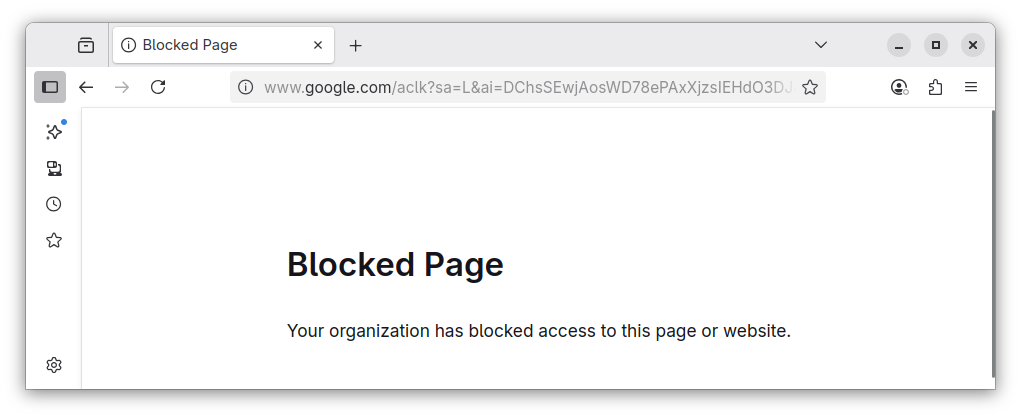
Here are the settings.
Firefox policies.json
"WebsiteFilter": {
    "Block": ["*://*.googleadservices.com/*", "*://*.google.com/aclk*"]
}
Google Chrome managed_policies.json
"URLBlocklist": ["googleadservices.com", "*.google.com/aclk*"]Those are part of a complete breakfast
with some other browser
settings, available as an easy-to-install RPM at dmarti/browser-adfraud-protection:
Policies to turn off problematic in-browser advertising features.
This is something that can go out to all users to address the most
urgent malvertising problem, with minimal disruption to the ads on legit
sites.
You can see the policies in effect on your browser, at:
about:policies on Firefox
chrome://policy/ on Chrome
In general I like the Privacy Badger approach, where the ads start
working on a site as soon as they change some key business practices,
better than general blocking. Ideally the people who run web sites would
read and act on the How
do I stop Privacy Badger from blocking me
section of their FAQ
(which needs an update since current browsers can send GPC but not DNT
but that’s a minor fix) Unfortunately, right now the web
advertising business is, thanks to Google, kind of a shitshow so
it’s going to take a while for sites to get on that. Blocking the most
problematic ads is a start—hey, if enough people do this, more of the ad
money will end up at legit sites and they’ll have a little budget and
time to fix things. More: fix Google Search
Bonus links
This
App Can Actually Keep You From Using Your iPhone by Justin Pot.
The problem with distraction-blocking apps is how easy they are to
turn off. But what if you needed to access a physical object to unblock
distractions? That way, you could leave the object at home, or give it
to someone who can keep you accountable.
GOP
Cries Censorship Over Spam Filters That Work by Brian Krebs.
Tossavainen told KrebsOnSecurity that WinRed’s emails hit its
spamtraps in the .com, .net, and .org space far more frequently than do
fundraising emails sent by ActBlue.
How
Wikipedia survives while the rest of the internet breaks by Josh
Dzieza. But as impressive as this archive is, it is the byproduct of
something that today looks almost equally remarkable: strangers on the
internet disagreeing on matters of existential gravity and breathtaking
pettiness and, through deliberation and debate, building a common ground
of consensus reality.
Dissecting
the Apple M1 GPU, the end by Alyssa Anne Rosenzweig. In 2020,
Apple released the M1 with a custom GPU. We got to work
reverse-engineering the hardware and porting Linux. Today, you can run
Linux on a range of M1 and M2 Macs, with almost all hardware working:
wireless, audio, and full graphics acceleration.
Glyph Lefkowitz: R0ML’s Ratio (Is an enterprise licensing agreement a good deal?)
How
to not build the Torment Nexus by Mike Monteiro. If you don’t
want to add more torment to the world you simply don’t build the Torment
Nexus. That’s basic math.
Related: Technically
Radical by frank miroslav. One important thing to emphasize about
the Tech Right is that it is not representative of the tech industry
as a whole and currently represents a tiny minority.
Improving
Geographical Resilience For Distributed Open Source Teams with
FREEON [T]he publisher of software that controls the signing key
is the weak link, even in today’s state of the art security
software.