21 Dec 2024

turning off browser ad features from the command line
(Previously: Google Chrome ad features checklist, turn off advertising features in Firefox.)
The Mozilla Firefox and Google Chrome browsers both have built-in
advertising features, which I generally
turn off because putting advertising features, even
privacy-enhancing
ones, in browsers is a
bad idea. But the problem with going in
to the settings and changing things is not just that it takes time
to find stuff, but that it only affects the one browser profile you’re
in. So every time I add a user account or a new browser profile, I still
need to go to Settings and change the defaults again.
Fortunately it’s possible to turn the ad stuff off once and have it stay off. Both browsers have enterprise management features.
With a few commands, you can be your own enterprise manager, put the right file in the right location, and not have to worry about it. (Complete files, RPM spec file, and more at: dmarti/browser-adfraud-protection: Policies to turn off problematic in-browser advertising features)
On Linux, the following content should go in
/etc/firefox/policies/policies.json for Firefox:
browser-adfraud-protection/policies.json
and the following content should go in
/etc/opt/chrome/policies/managed/managed_policies.json for
Chrome:
browser-adfraud-protection/managed_policies.json
(Update 28 Oct 2025) I replaced the code blocks in this blog post with links to the versions in Git, so I only have to update in one place as Mozilla keeps making new advertising features. So…many…advertising…features…
The full list of available settings is at Chromium
- Policy List. Some of these can be handy additions to the
managed_policies.json file especially if you use multiple
profiles. For example, I also add
"DefaultBrowserSettingEnabled": false so that Google Chrome
does not ask to be default browser.
Both files should be owned by the owner of the containing directory (root:root on my system) and mode 755.
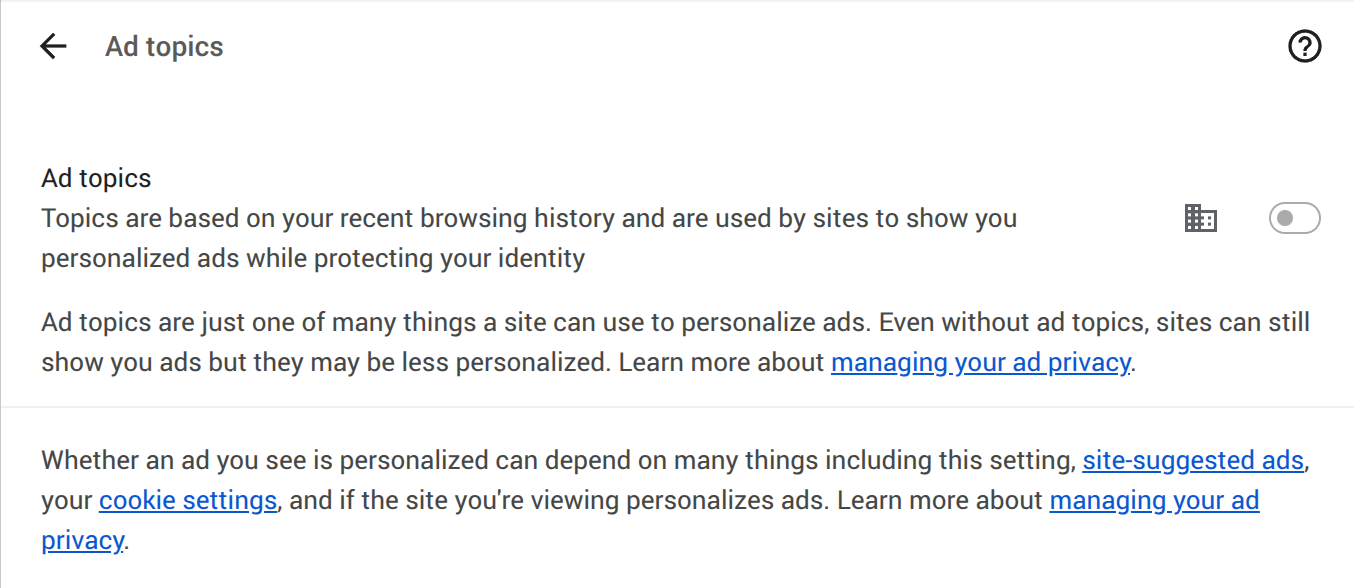
That’s it. You can check these in browser settings, and they should
show up as turned off. On Firefox they’ll just be grayed out, but Google
Chrome adds a little building symbol next to the on-off switch, with a
tooltip explaining that it’s managed by your organization.
There are ways to set this stuff up on Mac OS, too. I think it’s supposed to be
/Applications/Firefox.app/Contents/Resources/distribution/policies.jsonfor Firefox, but the /etc/ location might also work. For Google Chrome, there are Set up Chrome browser on Mac instructions.
There are also mentions of how to manage these two browsers on Microsoft Windows. If someone who blogs about those two OSs has instructions on how to set this up on other OS, please let me know and I’ll link to your blog post.
For Mac OS: See Enterprise Policies for Firefox Customization: A Beginner’s Guide
For Microsoft Windows: See Enterprise Policies for Firefox Customization: A Beginner’s Guide
Update to fix search malvertising
(update 7 Sep 2025) An enterprise policy can also help keep users safe from the big problem of fraud in search ads. Add a blocking policy to keep potentially problematic ad clicks from going through: Search malvertising protection using enterprise policies.
Appeasement fails, and one more tip
For about the past five years, a lot of proponents of in-browser ad
features have been going on about how we really need to let the
advertisers have their privacy-preserving
advertising systems in
the browser, because otherwise the surveillance business is going to do
something worse. But, as we can see from recent news, that’s not how
boundary testing works. They put the ad features in the browser, and
then went ahead and increased
fingerprinting anyway.
Browser developer: can we make the browser a little creepy so we don’t have to do worse stuff like fingerprinting?
User: ok, fine (clicks
Got it)Browser developer: well if you didn’t mind that, you won’t mind this…fingerprinting…either, right?
User: (facepalm)
Not a surprise for readers of relationship blogs, which tend to be more realistic about how to handle boundary testing than web development blogs. For example, Terri Cole writes about a constructive way to respond to boundary testing, in Navigating Boundaries: Strategies for Addressing Repeat Violations with Effective Consequences.
You’ve 1) set a boundary, 2) communicated it to them, and, after the boundary was crossed, 3) named a consequence to let them know, if this happens again, this is what I am doing.
Accepting any in-browser ad feature just encourages them to test boundaries again and make the browser incrementally creepier and more intrusive. Consequences need to happen early and predictably, or the person testing your boundaries learns that they can test further. Letting creepy behavior slide is a way to get more of it later.
How can users realistically communicate with big companies that only
pay attention to lawsuits, news stories, and metrics measured in
millions? You can’t really turn off browser fingerprinting—that’s the
point, it’s based on hardware or software features that are hard for the
user to change—but you can send a signal (and as a useful side effect
protect yourself from nasty stuff like malvertising
targeted based on your employer.) One of the best underrated privacy
tips is just to visit https://myadcenter.google.com/home
and set Personalized Ads
to Off
. This doesn’t just help
protect yourself and on
average, make yourself happier, it also (1) moves a metric that they
track, and (2) it does reduce surveillance advertising revenue, so you
help limit the flow of money to the other side. Turning this stuff off
is not mainly about protecting yourself, it’s about helping at-risk
people hide in the crowd and about reducing the incentives to
invest in surveillance.
No privacy setting or tool is a total fix by itself, but turning off in-browser ad features and turning off personalization are both pretty effective for the time invested. More tips: effective privacy tips
Bonus links
Companies issuing RTO mandates “lose their best talent”: Study (but it’s not about talent. When the company is increasing profits by more deception, surveillance, and value extraction from existing customers, then employees who can signal loyalty are more valuable than employees who might invent something new and legit, which is going to turn out to not get made because it doesn’t look as revenue-positive as the crime options anyway)
Surprise!
California’s 40 Qs of Rising Minimum Wage & Fast Food Industry
Growth (Beating USA) (There are a lot of possible reasons why the
Econ 101
answer turns out not to be right in the real world. An
hour of labor that the employer pays $20 for might be worth more than an
hour done by the same person for $10.)
Ghost artists on Spotify (Sounds like AI slop blogs on ad networks to me)
Why
Does U.S. Technology Rule? What I’m suggesting is that America’s
tech advantage may bear considerable resemblance to Britain’s banking
advantage. That is, it may have less to do with institutions, culture
and policy than the fact that for historical reasons the world’s major
technology hubs happen to be in the United States…
Feed
readers which don’t take “no” for an answer (More results from a
really useful tool. If, like me, your way to avoid The Algorithm is to
make your own feed reader, go sign up to see if you have all the
If-Modified-Since and related features working
correctly.)
The rise of informal news networks, We’ll stop looking down on content creators, Media owners will protect the powerful, Content creators find a place in newsrooms Declaring platform independence (My favorites from the Nieman Lab end of year series. Related: Does YouTube have a future if its creators have to make money elsewhere? IMHO this helps make a case for the strength of the YouTube scene—if YouTubers can keep doing their thing even when the algorithm stifles and demonetizes them, they’re doing something right.)
Watchdog to issue new guidance after report finds air fryers may be listening (More reasons why I still aspire to be the guy who cooks with just a vintage cast-iron skillet and a razor-sharp chef’s knife)
The Rush for AI-Enabled Drones on Ukrainian Battlefields (related: For first time, Ukraine attacks Russian positions using solely ground, FPV drones)
Nodriver:
A Game-Changer in Web Automation Designed to bypass even the most
sophisticated anti-bot measures, Nodriver is a high-performance,
asynchronous web automation framework tailored for developers who
require a robust and reliable tool for scraping, testing, and automating
web interactions.
(previously,
previously)
C.A.
Goldberg, PLLC Turned Ten and We Are Looking Back at the Firm’s Most
Memorable Moments Over the Past Decade!!! (Why Omegle is no longer a
thing, and a substantial part of the reason that Section 230 is no
longer a guaranteed everything is allowed if you can blame a user for
uploading it
rule.)
Trump2
Will Shake Up the “Competition Safe Spaces” What we know is that
there is complete paralysis in Brussels as we start to take a measure of
what may be coming our way – with decisions (DMA non compliance, Google
ad-tech) and policy initiatives all stalled in the wings, all in
suspended animation until the new Administration shows its true colours
and we figure out what threats and retribution might be coming our
way.
Australia fires publisher damages claim at Google, Australia approves law banning social media for under 16s (are they trying to grow a generation of teen Wikipedia editors and Fediverse influencers? might work)